
In today’s age of networked life, a reliable Wi-Fi is as crucial as electricity and water. Streaming movies and video calling, or even remotely controlling smart devices in the house, and virtually taking online classes, the entirety of life depends on seamless connectivity. However, the majority of houses still struggle with frustrating dead zones—those confoundingly frequent areas where the connection drops, videos lag for ages, or smart devices drop out randomly. This is exactly how HW600A Mesh Technology covers every corner, ensuring that your entire home stays connected without interruption.
No matter if it’s a home office confined to the basement, an upstairs bedroom that you sleep in and enjoy, or the patio on which you unwind after work, these signal gaps can hamper productivity, entertainment, and general ease. It’s not only inconvenient—it’s a disruption to your whole digital life.
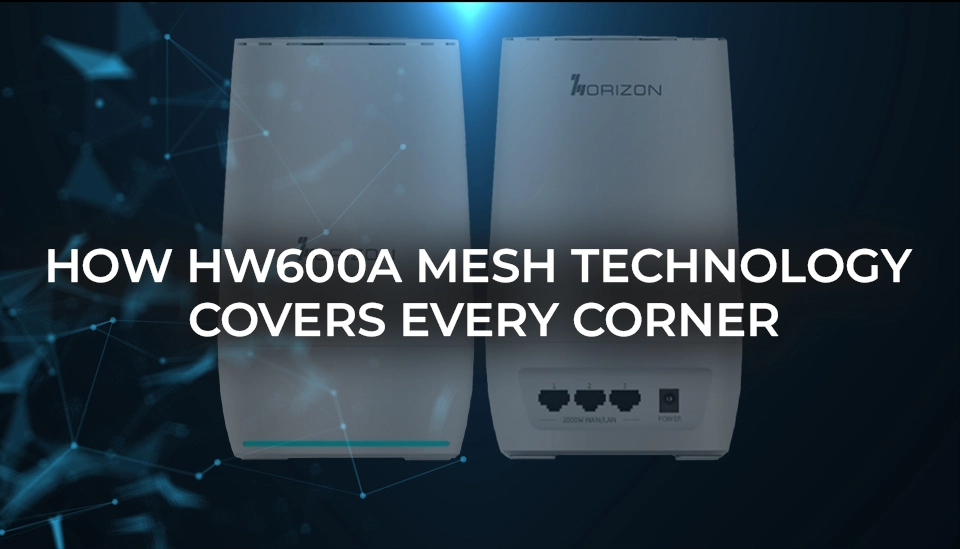
That’s where the Horizon HW600A enters the picture. With the most recent mesh networking technology, this is a powerful system that’s designed to kill dead spots and deliver seamless, wall-to-wall coverage throughout your home. Unlike older routers that rely on a single point of transmission, the HW600A cleverly coordinates with mesh nodes to create a single network that automatically adjusts to your environment and usage.
What are Wi-Fi dead zones and why do they occur?
Before going headlong into the fix, it never hurts to know what the problem is. Dead spots are where your main router’s signal just can’t extend through to other parts of your home because there’s something physically in the way, or because your home is simply larger than a single router is actually capable of handling.
Legacy routers have one signal coming from a single location, and the signal degrades with distance. In a big house or an unusually configured house, this will frequently result in incomplete coverage, slow throughput per room, or complete disconnects.
Enter mesh networking: The game-changer built into the HW600A
The HW600A is not your run-of-the-mill router—it has mesh networking features that enable it to play well with satellite units or mesh nodes. Rather than having all the workload on a single device, the HW600A provides Wi-Fi coverage smartly around your house.
Here’s how it works:
- Multiple connection points: The main HW600A router can pair with compatible mesh extenders to form a unified network that blankets your entire space.
- Smart handoff: As you move around your home, your device automatically connects to the strongest signal point—no need to manually switch networks.
- Consistent performance: Unlike Wi-Fi extenders that create separate SSIDS, the HW600A’s mesh system maintains one smooth, uninterrupted network.
How HW600A solves daily coverage issues
Each of the two homes is unique. Some have concrete walls, some have expansive floor space, and a whole lot of them are full of smart devices and family members all competing for bandwidth. HW600A gets right to the point with adaptive mesh networking, designed to automatically boost your signal, strengthen connections, and deliver reliable Wi-Fi performance on each square inch of your home.
Here’s a closer examination of some of the most common coverage problems homeowners face—and how the HW600A delivers rock-solid solutions to all of them.
Weak signal bedrooms upstairs
On multi-story homes, Wi-Fi signals weaken as they travel through ceilings and floors, resulting in weak or patchy coverage in upstairs bedrooms.
HW600A Solution: By setting up mesh nodes on the second floor or trouble spots, HW600A extends your Wi-Fi to the farthest reaches upstairs. These nodes merely repeat the master unit’s signal, creating strong and secure connections for streaming, browsing, or video call attendance—even the house’s furthest corner.
Backyard or balcony streaming
It’s popular to remove the device from indoors and venture out, either to stream tunes at a BBQ, make video calls off the patio, or stream a film on the balcony. Unfortunately, most factory-default routers don’t penetrate outdoor walls, resulting in sudden disconnects and slow speeds outdoors.
HW600A Solution: Positioning a mesh node strategically close to an exterior window or wall allows the HW600A to project a strong, stable signal out of the house. That means uninterrupted Internet access when lounging in the backyard or working on your balcony without having to get closer to the router.
Basement offices or home gyms
Basements are particularly poor for Wi-Fi. Concrete and brick are heavy materials that will severely attenuate or cut off wireless signals, and it will be virtually impossible to have a decent connection downstairs.
HW600A Solution: The mesh technology of the HW600A expertly guides the signal along less congested paths using strategically placed mesh nodes to offer good coverage in basement areas. From home-office-based work-from-home Zoom calls to powering connected fitness equipment within a home gym, the link is fast and solid.
Multiple users, multiple rooms
Homes today are virtual battlegrounds, where everybody streams, plays, works remotely, and learns online—all at the same time. In such hectic environments, bandwidth can be stretched thin in a split second.
HW600A Solution: With simultaneous multi-device support in mind, the HW600A employs dynamic signal balancing and intelligent device prioritization to keep everyone connected all the time. Each mesh node is also a traffic controller, directing data efficiently across the home so that no one ever has to endure buffering, sluggish downloads, or lost connectivity.
Odd-shaped homes or obstructed layouts
Houses with odd shapes, thick interior walls, or thick furniture do have the ability to produce physical barriers that interfere with the wireless signals to render areas of the house inaccessible.
HW600A Solution: Whereas standard routers project signals from a single point, the HW600A mesh network allows you to have complete mastery of the network’s design. The nodes can be placed intentionally in areas that would not be within the range of your primary router; otherwise, establishing coverage in each empty space and giving you the same range regardless of how erratically and unevenly the measurements and layout of your home may be.
Why HW600A outperforms traditional extenders
You might be wondering: why not just use a Wi-Fi extender? While extenders seem like a quick fix, they often create a disjointed network that requires manual switching, adds latency, and halves your bandwidth. The HW600A’s mesh system, on the other hand:
- Maintains one unified network (no toggling between “HomeWiFi” and “HomeWiFi_EXT”)
- Dynamically adjusts traffic routes for optimal speed and reliability.
- Offers full-bandwidth access at every point in the mesh system
The result? A seamless, fast, and frustration-free experience, regardless of where you are in your home.
A setup so simple, anyone can do it
Setting up a mesh network with the HW600A is designed for everyday users, not IT pros. Using the intuitive Horizon Wi-Fi app, you can:
- Add mesh points with just a few taps
- Monitor coverage and signal strength by room
- Set preferences for parental controls or guest access
- Run speed and performance checks instantly
It’s plug-and-play, and everything updates automatically—no need to fiddle with complex settings.
Built for the future, not just today
The HW600A’s mesh-ready design isn’t just about solving today’s coverage issues—it’s built to grow with your needs:
- Expandability: Add more nodes as your space or device count increases.
- OTA updates: Receive regular firmware improvements for security and performance.
- Smart prioritization: Mesh nodes automatically balance bandwidth based on usage patterns and connected devices.
Whether you’re installing new smart home gear, upgrading to fibre, or adding a backyard office pod, the HW600A ensures your Wi-Fi is ready.
Frequently asked questions: How HW600A Mesh technology covers every corner
Q1. What is a ‘Wi-Fi Mesh router’?
Mesh Wi-Fi routers can work in conjunction to other mesh routers to form a network of router (nodes) communicating together to give your whole home unbroken and continuous wireless coverage. A traditional single-point router is different and has dead zones where as mesh networks provide you with continuous signal strength wherever you are in your home.
Q2. Does HW600A require additional devices to create a mesh network?
Inside the box, HW600A is a single-router powerhouse. To deliver a full mesh network, it can just mate with compatible mesh nodes or extenders—available separately—through the Horizon ecosystem.
Q3. Can HW600A work in a big house or a multi-level home?
Yes. Mesh scalability was incorporated into HW600A. You can blanket big or multi-level houses by adding nodes without sacrificing speed or signal integrity.
Q4. Do I need to switch Wi-Fi networks manually when roaming within the home?
No way. Mesh way, HW600A provides a seamless and continuous experience. Your device seamlessly switches to the closest, most powerful segment of the network without dropping or losing your connection.
Q5. Is HW600A mesh network difficult to install?
It’s extremely simple. Horizon app guides you through with simple, step-by-step instructions. Most people are up and running in under 15 minutes—even with multiple nodes.
Q6. Will HW600A get rid of basements or garages of Wi-Fi dead spots?
Yes. Perhaps the most impressive feature of mesh network technology is how far it extends into difficult-to-reach places such as basements, garages, and attics. Simply put a mesh node in the general area of the weak spot, and HW600A will handle the rest.
Q7. Can a hundred devices be connected to the HW600A mesh network simultaneously?
The HW600A covers 25–30+ devices simultaneously. Smart cameras, smartphones, tablets, TVs, or laptops, the mesh network binds them all without the lag.
Q8. Does mesh Wi-Fi slow down my internet speed?
Not with the HW600A. Unlike standard extenders that can cut bandwidth in half, the HW600A’s smart routing and full-duplex mesh preserve speeds for your entire network.
Q9. Is the HW600A secure for smart home devices?
Yes. It also includes support for advanced encryption, firmware update automatically, and isolation of devices—protection of your smart devices from tampering or unauthorized access.
Q10. Can I integrate more nodes into it at a later date, should my requirements increase?
Yes. The HW600A is absurdly expandable as far as its mesh technology goes. You can start with the main router and just add on extra nodes whenever you feel like it—beautifully suited for expanding families, new home construction, or shifting tech configurations.
Final thoughts
Those days of entering a room and finding a maddening Wi-Fi dead zone or having to sit closer to the router to receive a solid signal are gone. With the Horizon HW600A and its sophisticated mesh technology, your entire home becomes one seamless coverage zone. Whether you’re in the kitchen, on the second floor, or enjoying the outdoors, every room, every floor, and even the most challenging spaces remain consistently connected, without compromise.
The HW600A is not simply another router—it’s the foundation of a wiser, more effortless digital way of life. Built to conform to your individual home design and usage requirements, it provides an experience that connects you wherever you are. From work-from-home configurations to streaming binges and managing your smart home, the HW600A guarantees that your internet experience is quick, consistent, and unbroken.
Bid farewell to lost signals, sluggish speeds, and irritating buffering. With the HW600A, your Wi-Fi experience is about to soar to new heights.
Learn more about How HW600A Mesh Technology Covers Every Corner here.
Related Posts
Best WiFi Routers for Small Businesses
An In-depth Guide to Choosing the Best Family WiFi Routers
Best WiFi Router for Large Homes: An In-Depth Guide
Best Affordable WiFi Router: Your Guide to Budget-Friendly Performance
Best WiFi Router for Multiple Devices
Best Place for WiFi Router: Optimize Your Network Performance
Top Rated Wireless Routers In Usa
Router For Internet Cafe
What is a Wireless Router, and How Does It Work?